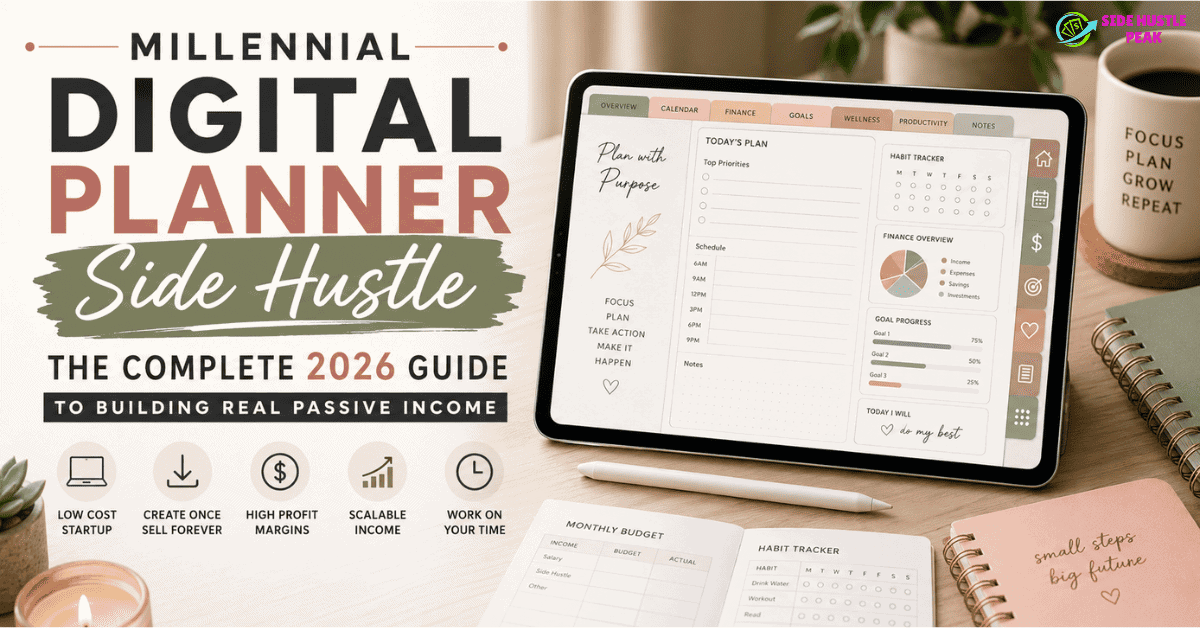
You already use a digital planner to organize your week. What if that same habit — planning, organizing, tracking — could quietly earn you $1,500 to $5,000 every single month while you sleep?
That’s the exact premise behind the millennial digital planner side hustle, and in 2026, it’s no longer a niche secret. It’s one of the most beginner-friendly, low-cost, and genuinely scalable ways to earn passive income online — and millennials are absolutely dominating this space.
This is the only guide you need. Not a surface-level listicle, not a vague “you can do it” motivational piece. A real, honest, step-by-step breakdown of exactly what the millennial digital planner side hustle is, how much you can realistically earn, which tools actually work, which platforms to sell on, how to market without a massive following, and what the top sellers are doing differently in 2026 that everyone else is missing.
Let’s go.
What Is the Millennial Digital Planner Side Hustle?
The millennial digital planner side hustle is the practice of creating digital planning templates — budget trackers, daily planners, goal-setting journals, habit trackers, and productivity tools — and selling them as downloadable files on platforms like Etsy, Gumroad, or Shopify. You design the product once and sell it to hundreds or thousands of buyers with zero inventory, zero shipping, and near-100% profit margins.
The digital planner market was valued at roughly $7.8 billion in 2023 and is projected to hit $25.6 billion by 2031. The planning app segment alone was worth $2.55 billion in 2021 and is expected to reach $7.05 billion by 2033. These numbers tell one clear story: people are buying digital planning tools constantly, and millennials are the ones creating and selling them.
Why millennials specifically? Because this generation is uniquely positioned. You grew up with technology. You understand digital tools intuitively. You value organization and productivity. You’re comfortable working online. And — crucially — you’ve probably already been using digital planners yourself, which means you genuinely understand what buyers want.
Why the Millennial Digital Planner Side Hustle Is the Smart Money Move in 2026
Before we get into the how, let’s talk about the why. Because there are hundreds of side hustle options out there, and you deserve to know exactly what makes this one stand out.
- You create once and sell forever. This isn’t freelancing, where you trade hours for dollars. You design a budget planner on a Tuesday afternoon and that same file can generate revenue every day for the next five years. That’s the fundamental appeal of the millennial digital planner side hustle — your time investment does not cap your income.
- The startup cost is essentially zero. Canva’s free tier is powerful enough to design a professional digital planner. Etsy charges $0.20 per listing. Your total investment to launch can be under $5.
- The profit margins are extraordinary. Digital products on Etsy average 85–95% profit margins. No materials. No packaging. No shipping. No inventory storage. Every sale is almost pure profit after platform fees.
- It fits around any schedule. Working a 9-to-5? You can build this on evenings and weekends. Stay-at-home parent? Nap time and bedtime are your business hours. This is not a hustle that requires clocking in.
- Demand is not slowing down. In 2026, Etsy has over 96 million active buyers. One of the product categories on the marketplace that is expanding the fastest is digital downloads. The audience is already there, searching for exactly what you can create.
What Makes a Digital Planner “Millennial-Specific”?
Great question — and one that matters a lot for your success with this side hustle.
Millennial buyers (ages 28–43 in 2026) have different needs, aesthetics, and pain points than Gen Z or Baby Boomers. They’re looking for tools that address real adult life pressures: debt payoff, budgeting on variable income, managing side hustles alongside full-time jobs, mental health and productivity balance, parenting schedules, career transition planning, and building financial security.
The millennial digital planner side hustle that works in 2026 isn’t selling a generic daily to-do list template. It’s solving a specific, painful, relatable problem for a person in their 30s who is juggling real life.
High-converting millennial planner niches:
- Debt payoff and financial freedom trackers
- Budget planners for irregular or freelance income
- ADHD-friendly weekly organization systems
- Side hustle income and expense trackers
- Career change and job search planners
- First-time homebuyer checklists and trackers
- Postpartum recovery and new parent organization tools
- Couple’s financial goal planners
- 90-day goal-setting and habit systems
- GoodNotes and Notability-compatible iPad planners
The sellers winning at the millennial digital planner side hustle in 2026 have niched down hard. Not “budget planner” — but “ADHD-friendly biweekly budget tracker for irregular income.” Not “daily planner” — but “work-from-home productivity planner for remote freelancers.” Specificity converts browsers into buyers.
How Much Can You Realistically Earn?
Let’s skip the fantasy income claims and talk real numbers.
Realistic Income Timeline for the Millennial Digital Planner Side Hustle:
| Timeline | Monthly Earnings | What’s Happening |
| Month 1–2 | $0–$150 | Learning tools, listing first products, zero reviews |
| Month 3–4 | $100–$500 | First sales, building shop credibility, refining listings |
| Month 5–8 | $400–$1,500 | Gaining Etsy algorithm traction, growing catalog |
| Month 9–12 | $1,000–$3,500 | SEO compound effect kicks in, repeat buyers |
| Year 2+ | $2,000–$8,000+ | Established shop, passive catalog working for you |
What Real Sellers Are Earning:
One vendor reported making $17,540 over the course of 14 months while working 8–12 hours a week as a part-time side hobby to sell digital planners and templates on Etsy. By month 14, she was earning $2,810 in a month she worked roughly 24 hours total — effectively $117 per hour.
Another digital planner shop hit consistent $2,000–$3,500 monthly income by month 8 after niching down specifically into wedding planning printables.
According to data from Etsy revenue research, digital product shops average $29,324 annually in revenue with profit margins far above physical product sellers. Top sellers in specific niches like digital planners can exceed $10,000 per month.
The truth? The millennial digital planner side hustle is not a get-rich-quick scheme. Months one through three will feel slow and discouraging. Most people quit here. The ones who push through to month seven to month nine are the ones earning full-time income from a part-time project.
Step-by-Step: How to Start Your Millennial Digital Planner Side Hustle from Scratch
Step 1: Choose Your Niche (The Most Important Decision You’ll Make)
Generic sells slowly. Specific sells fast.
Before you open Canva, answer these three questions:
- What do I personally struggle to organize or track?
- What does my millennial peer group constantly complain about managing?
- What planning problem is specific enough to be underserved but broad enough to have real demand?
Research tool: Open Etsy and search “digital planner.” Sort by “Most Relevant.” Look at what’s selling, read the reviews, and notice the gaps — things buyers are requesting in reviews that sellers aren’t offering yet. That gap is your niche.
eRank and Marmalead are low-cost tools that show you Etsy keyword search volume, competition levels, and trending products. A $5/month investment in eRank early in your millennial digital planner side hustle can save you months of guessing.
Step 2: Create Your First Digital Planner
You do not need design school, Adobe software, or an art degree. Here are the best tools for creating your first planner:
Canva (Free or $13/month Pro) The default tool for the millennial digital planner side hustle in 2026. Canva’s free tier has thousands of templates, text tools, graphic elements, and a simple PDF export. Canva Pro adds background removal, brand kits, and a much larger asset library.
To create a hyperlinked, interactive digital planner in Canva:
- Design each page/tab as a separate Canva page
- Add shape buttons that link to specific pages using Canva’s “Link” feature
- Export as an interactive PDF with “hyperlinks” turned on
- Test on GoodNotes or Notability before listing
PowerPoint or Google Slides (Free) Surprisingly powerful for planner creation and underused by most beginners. Easy to create hyperlinked tabs and navigation buttons. Export as PDF.
PlanifyPro (Specialized) A tool specifically designed for creating GoodNotes-compatible digital planners. Has a steeper learning curve but produces professional results that command premium prices.
What your first planner should include:
- A clear cover page with your planner’s name and purpose
- Hyperlinked tab navigation (this is what buyers expect)
- 20–50 pages is a solid starting size
- Consistent color scheme and font pairing
- Instructions page (reduces refund requests dramatically)
Step 3: Set Up Your Etsy Shop
Etsy is the primary marketplace for the millennial digital planner side hustle in 2026, and for good reason: 96 million active buyers, strong search intent, and a built-in audience already shopping for exactly what you’re making.
Etsy shop setup checklist:
- Shop name: Include a relevant keyword if possible (e.g., “ClearDayPlanners,” “MintLineDesigns”)
- Shop banner and logo: Canva has free Etsy banner templates
- About section: Write authentically — buyers connect with real humans
- Shop policies: Clear digital download policies prevent disputes
- Payment: Set up Etsy Payments (required for most US sellers)
How to create a listing that actually sells:
- Title: Front-load your main keyword. For instance, “ADHD Digital Planner for iPad | GoodNotes Budget Tracker | Millennial Productivity Planner 2026”
- Photos: Use mockup images (Canva has iPad and tablet mockups) showing your planner in use — lifestyle shots outperform flat design screenshots
- Description: Write for the buyer’s problem, not your product’s features. Lead with “Are you tired of…” or “If you’ve been struggling with…”
- Tags: Use all 13 tags with specific keyword phrases buyers actually search
- Price: Start at $5–$12 for individual planners, $15–$35 for bundles
Step 4: Expand Beyond Etsy
Once your Etsy shop has traction, diversifying your platform is smart business. Top sellers in the millennial digital planner side hustle space typically sell on multiple platforms:
Gumroad — Zero listing fees, simple checkout, great for email list building. Charge what you want, keep most of it.
Shopify — For sellers ready to own their platform entirely. More setup required but no marketplace competition.
Stan Store — Quickly becoming a favorite among millennial creators in 2026. Link-in-bio store that integrates with Instagram and TikTok. Low fees, easy digital delivery.
Payhip — Another low-fee option with strong affiliate marketing features built in.
Your own blog or website — Long-term, the most profitable channel because you own 100% of the customer relationship and keep 100% of the revenue. Driving blog traffic to your own store eliminates Etsy fees entirely.
Step 5: Market Your Millennial Digital Planner Side Hustle Without a Big Following
You do not need 50,000 Instagram followers to sell digital planners. Here’s where traffic actually comes from for successful sellers:
Pinterest (The #1 Traffic Driver for Digital Planners)
Pinterest is a search engine, not a social media platform — and that distinction matters enormously for your millennial digital planner side hustle. Millennial women (your primary buyer) use Pinterest daily to search for productivity tools, budget templates, and organization ideas.
How to use Pinterest to drive sales:
- Create a Pinterest business account (free)
- Create boards with keyword-rich names: “Digital Planner Ideas,” “GoodNotes Templates,” “Budget Planner Printables”
- Design pins in Canva (vertical, 1000x1500px) showing your planner pages beautifully
- Write descriptions using full sentences with natural keywords
- Pin consistently: 5–10 pins per day using Tailwind’s scheduling tool saves time
- Link every pin directly to your Etsy listing or website
Instagram posts do not last as long as Pinterest pins. In two years, a pin you make now can still generate traffic. For passive income through a millennial digital planner side hustle, Pinterest is the perfect long-term channel.
TikTok and Instagram Reels (Speed + Discovery)
Short-form video is where new sellers go from zero to their first hundred sales fastest in 2026. You don’t need professional lighting or studio setups. Film your phone or iPad screen showing your planner in action. Narrate your thought process: “Here’s how I use my ADHD budget tracker to manage my freelance income…”
Content ideas that perform well:
- “I designed this planner because I couldn’t find one that actually worked for my brain”
- “Here’s how I make $X/month selling digital planners (realistic)”
- “Setting up my GoodNotes planner for the week” — process videos
- “3 digital planner mistakes beginners make on Etsy”
Etsy SEO (Your Organic Foundation)
Inside Etsy itself, SEO is everything. The Etsy algorithm decides who sees your listing based on relevance to the buyer’s search. Your listing title, tags, and description all feed this algorithm.
Tools to improve your Etsy SEO:
- eRank (free and paid tiers)
- Marmalead ($9.99/month)
- EverBee (freemium)
These tools show you exactly which keywords buyers are searching, how competitive each keyword is, and how your listing performs. Spending 30 minutes on Etsy SEO per listing is worth more than any paid ad in the early stages of your millennial digital planner side hustle.
The 2026 Millennial Digital Planner Side Hustle Trends You Need to Know
The market has shifted. Here’s what’s working now versus what worked three years ago:
What’s WORKING in 2026:
Hyper-specific niche planners: “Budget planner” is oversaturated. “Debt payoff tracker specifically designed for millennial women on variable income” converts like crazy. The more specific your planner, the less competition and the more loyal your buyers.
ADHD-friendly productivity tools: Neurodivergent-friendly planners are among the fastest-growing subcategories in the millennial digital planner side hustle space. Minimal design, clear visual hierarchy, flexible structure, and undated formats appeal to a massive underserved audience.
GoodNotes 6 and Notability compatibility: Buyers specifically search for iPad-compatible planners with hyperlinked tabs. If your planner works seamlessly on GoodNotes 6, say so prominently in every title and listing.
Notion templates: A growing segment of the millennial digital planner side hustle ecosystem involves selling Notion templates — life dashboards, freelance client trackers, financial freedom systems. These sell at higher price points ($15–$75) because they’re more complex and buyers perceive higher value.
Bundled planner systems: Instead of selling one planner for $7, sell a complete system — daily planner + budget tracker + habit tracker + goal journal — bundled for $19–$29. Bundles increase average order value significantly.
What’s FADING in 2026:
- Generic 200-page “all-in-one life binder” planners
- Heavily decorative planners with low functionality
- Physical printable planners competing against digital-first designs
- Planners without hyperlink navigation
Pricing Strategy for Your Millennial Digital Planner Side Hustle
Pricing digital products feels weird at first because there’s no material cost to anchor you. Here’s a framework that works:
Entry-level single planners: $4–$9 Good for building reviews and initial sales volume. Don’t stay here forever.
Standard complete planners: $10–$18 Your primary price point. Enough to feel like real income per sale, low enough to impulse-buy.
Premium niche planners: $18–$35 ADHD-specific systems, GoodNotes multi-tab planners, Notion dashboards. Buyers expect to pay more for something clearly specialized.
Bundle packs: $20–$45 “Complete Millennial Financial Wellness Bundle” — 5–8 planners bundled together. High perceived value, significantly higher revenue per transaction.
Digital planner courses or templates-for-sellers: $47–$197 Advanced tier. Once you’ve built credibility, you can teach others to build their own millennial digital planner side hustle. This is how many top sellers 10x their income.
The Real Talk Section: What Nobody Tells You About the Millennial Digital Planner Side Hustle
Let’s be completely honest here — because the YouTube thumbnails and income screenshots don’t tell the full story.
The first three months will feel like nothing is working. That’s normal. Etsy’s algorithm takes time to index your shop. Your first sale might come in week six. Your first $100 month might be month four. The sellers who make $3,000+ per month all went through this phase and kept going anyway.
You will need to create multiple products before things click. Most successful shops have 50–200 listings. Not because every product sells, but because the Etsy algorithm rewards shops that look complete and active. Your third or fourth planner might be the one that takes off. Your first might barely sell.
Reviews are everything. Five-star reviews are your currency on Etsy. Your first 10–20 reviews change your listing’s click-through rate dramatically. Consider pricing your first few planners low to encourage purchases and then follow up to encourage reviews.
Etsy fees add up. Here’s the real fee breakdown for 2026:
- Listing fee: $0.20 per item (renewed every 4 months)
- Transaction fee: 6.5% of sale price + shipping
- Payment processing: 3% + $0.25
On a $12 planner sale, you keep roughly $10.50 after fees. Still excellent margins — but understand the math before you price.
Seasonal patterns are real. Your busiest months are January (New Year’s goal-setting), August/September (return to school), and November/December. Plan your new product launches around these seasons for maximum impact.
Tools and Resources for Your Millennial Digital Planner Side Hustle
Design Tools:
- Canva (free) — primary design tool for most beginners
- Canva Pro ($13/month) — worth it after your first few sales
- Adobe Express (free tier) — alternative to Canva
- PlanifyPro — specialized for GoodNotes planners
Etsy SEO Tools:
- eRank (free + paid) — keyword research, competition analysis
- Marmalead ($9.99/month) — deeper Etsy SEO insights
- EverBee (freemium) — product research, revenue estimates
Pinterest Scheduling:
- Tailwind ($14.99/month) — automates your Pinterest pinning strategy
Mockup Creation:
- Canva (iPad and tablet mockups built in)
- Creative Market (premium mockup bundles)
- Pixelbuddha (free and premium mockups)
Shop Analytics:
- Etsy’s built-in Shop Manager stats
- Google Analytics (connect via Etsy)
- eRank’s shop audit tool
Scaling Your Millennial Digital Planner Side Hustle to $3,000+/Month
Once you’ve made your first $500 month, here’s how to scale:
Expand your catalog systematically. Don’t create random planners — create variations within your niche. If your ADHD budget tracker is selling, create an ADHD weekly planner, ADHD habit tracker, and ADHD meal planner. Your buyers who loved the first product become repeat customers.
Build an email list from day one. Add a “free mini planner” as a bonus inside every purchase. Use it to collect emails via Mailchimp or ConvertKit. Your email list is your direct line to buyers who already love your work — independent of Etsy’s algorithm.
Create your own website. A blog around your planner niche drives long-term organic traffic through Google. Article topics like “best digital planners for ADHD,” “how to set up GoodNotes for budgeting,” and “digital planning for millennials” bring warm buyers directly to your shop without Etsy fees.
Launch a digital planner course. In the millennial digital planner side hustle, this is how many successful salespeople go from making $2,000 to making over $8,000 a month. Once you’ve built a shop that earns consistently, your process itself has value. Teach others on Teachable, Gumroad, or your own site.
Affiliate marketing. Recommend tools you actually use — Canva, eRank, Tailwind, Notion — and earn commissions when your audience signs up. Layering affiliate income onto planner sales significantly boosts monthly earnings.
Millennial Digital Planner Side Hustle vs. Other Digital Side Hustles: How Does It Compare?
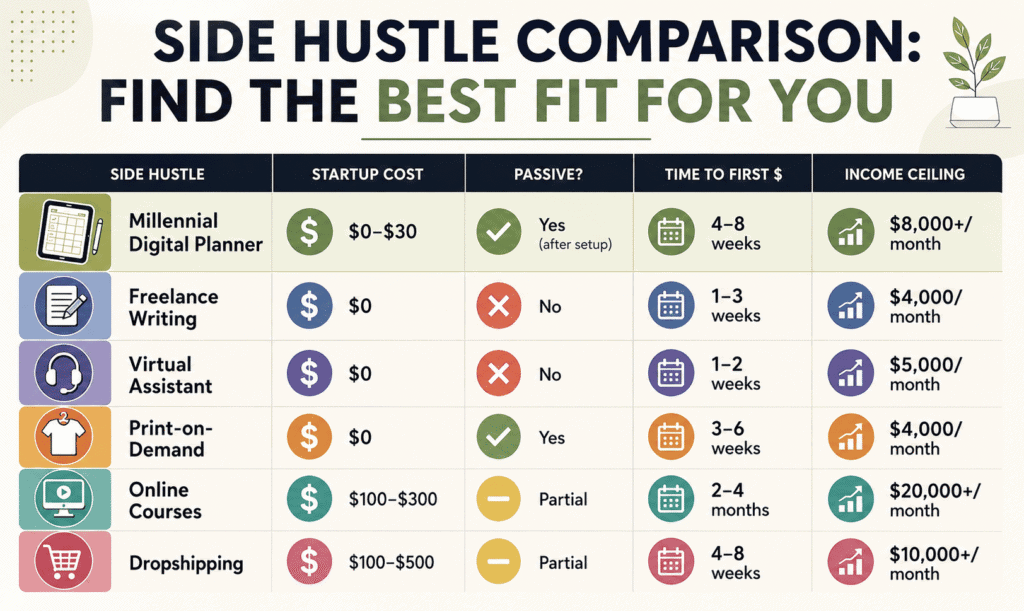
The millennial digital planner side hustle sits in an exceptional middle ground: near-zero startup cost, genuinely passive income after initial setup, and a clear scaling path that doesn’t require constant active work.
Frequently Asked Questions About the Millennial Digital Planner Side Hustle
What exactly is a millennial digital planner side hustle?
It’s the practice of creating downloadable digital planner files — budget trackers, daily planners, habit journals, goal-setting systems — and selling them on platforms like Etsy, Gumroad, or your own website. You design the product once and sell it an unlimited number of times.
How much does it cost to start a millennial digital planner side hustle?
You can start for under $5. Canva is free. Your first Etsy listing costs $0.20. Most successful sellers started with less than $30 total before making their first sale.
How long does it take to make money with the millennial digital planner side hustle?
Most sellers see their first sale between weeks four and eight. Consistent income of $500+ per month typically happens between months four and eight. Reaching $2,000+/month usually takes nine to fourteen months of consistent effort.
Do I need design experience to start a millennial digital planner side hustle?
No. Canva is genuinely beginner-friendly, and there are hundreds of free YouTube tutorials specifically on creating digital planners. Most successful planner sellers are self-taught.
What are the best-selling types of digital planners for millennials in 2026?
ADHD-friendly planners, debt payoff trackers, freelance income trackers, GoodNotes-compatible iPad planners, Notion life dashboards, and couple’s financial planners are among the top-performing categories in 2026.
Can I sell digital planners if I already work full-time?
Absolutely — this is one of the primary appeals of the millennial digital planner side hustle. The creation work happens on your schedule. Once your products are listed, Etsy processes sales and delivers files automatically, 24/7, without any action from you.
Is the millennial digital planner market too saturated in 2026?
The broad market is competitive, but specific niches are not. “Daily planner” has 40+ million listings. “ADHD-friendly biweekly budget tracker for freelancers” has almost none. The millennial digital planner side hustle rewards specificity over volume.
What’s the best platform to sell digital planners besides Etsy?
Gumroad, Stan Store, Payhip, and your own Shopify or WordPress store are the top alternatives. Many successful sellers use Etsy for discovery and their own website for repeat buyers to avoid marketplace fees.
How do I price my digital planners?
Start with $7–$12 for individual planners and $20–$35 for bundles. As you accumulate five-star reviews and niche authority, you can raise prices. Premium specialized planners (Notion dashboards, GoodNotes multi-system planners) can command $25–$75.
Is the millennial digital planner side hustle really passive income?
Partially. The income from existing listings is passive — Etsy sells and delivers files automatically. Growing your catalog and maintaining your shop requires ongoing effort. The realistic model is: active effort for six to twelve months, then increasingly passive income as your catalog compounds.
Action Plan: Your First 30 Days in the Millennial Digital Planner Side Hustle
Week 1: Research your niche using Etsy search and eRank. Identify one specific planner idea with clear demand and manageable competition. Create a free Canva account.
Week 2: Design your first digital planner. Aim for 25–40 pages. Add hyperlinked navigation. Export as an interactive PDF. Test on your phone or tablet.
Week 3: Open your Etsy shop. Create your first 3–5 listings. Write keyword-rich titles and descriptions. Use Canva iPad mockups for listing photos.
Week 4: Set up a Pinterest business account. Create 10–15 pins for your planners. Research one competitor’s shop thoroughly and note what they’re doing well.
After 30 Days: Examine which listings are receiving views. Improve the descriptions on low-performing listings. Start designing your second planner, this time informed by what buyers are clicking on.
Final Word: Is the Millennial Digital Planner Side Hustle Worth Starting in 2026?
Yes. Unambiguously yes.
The market is growing. The tools are free and accessible. The startup cost is effectively zero. The income model is genuinely passive once your catalog is built. And unlike most side hustles that plateau quickly, the millennial digital planner side hustle scales — more products, more niches, email lists, affiliate income, and eventually your own courses.
The question isn’t whether the millennial digital planner side hustle works. It’s whether you’re willing to push through the first three months when the results feel invisible, knowing that the compounding value you’re building will pay you back for years.
Month one is the hardest. Month twelve feels like a completely different reality.
Start this week. Your future self will thank you.
sidehustlepeak.com — Honest side hustle strategies built for people in real life, not Instagram highlight reels. Bookmark this page and check back for updated income reports, tool reviews, and niche breakdowns.
You may also find this helpful: [30 Best Side Hustle Local to Start in Your City (2026 USA Guide)].